Scanco User Instructions: Difference between revisions
| Line 11: | Line 11: | ||
:The session manager automatically starts after a user logs in locally. For remote sessions, the session manager can be started with the command $ vue . | :The session manager automatically starts after a user logs in locally. For remote sessions, the session manager can be started with the command $ vue . | ||
:[[Image:SessionManager.jpg]] | :[[Image:SessionManager.jpg | 200px]] | ||
Revision as of 20:42, 22 September 2020
OpenVMS
OpenVMS References
OpenVMS Basics
OpenVMS (informally known as VMS) is a high-end computer server operating system with reliable, multitasking, real-time and batch processing. OpenVMS supports computer clustering via a LAN, enabling computers to share resources such as processors and disks to balance workload efficiently.
The Session Manager
- Session
- The session manager automatically starts after a user logs in locally. For remote sessions, the session manager can be started with the command $ vue .
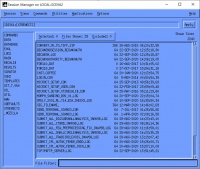

- Views (directory shortcuts)
- Commands and Utilities
- Applications
Helpful VMS commands
- Directory listing
$ dir /size=all /grand_total [...]
$ dir [...*.aim]
- Delete
$ delete *.aim;*
$ dl *.aim
- Delete a directory that is full. CAUTION!
$ SET FILE/PROT=O:RWED [.SUBDIR...]*.*;*
$ DELETE [.SUBDIR...]*.*;*                  ! Repeat until no error messages appear.  Each iteration gets rid of more sub directories.
$ SET FILE/PROT=O:RWED SUBDIR.DIR
$ DELETE SUBDIR.DIR;
or
$ dl disk2:[microct.projects...]*.dir     ! A for all; do until sub-dirs are gone
$ dl subdir.dir
$ @scom:dl.com subdir.dir
If the file cannot be deleted to due a permission error
$ purge 12_RAD_FX.AIM
%PURGE-W-FILNOTPUR, error deleting DISK4:[BONELAB.PROJECTS.MULTILOAD.CAMOS]12_RAD_FX.AIM;1
-RMS-E-FLK, file currently locked by another user
Do the following:
$ set ho 0  ! log in as calibration
$ spb
$ del DISK4:[BONELAB.PROJECTS.MULTILOAD.CAMOS]12_RAD_FX.AIM;1
$ logout
If that still doesn't work, then maybe you need to kill a process first:
$ show device  disk4 /file   ! shows all the files currently involved in a process
$ set ho 0     ! log in as 'system'
$ stop /id=2081F1EC
$ del DISK4:[BONELAB.PROJECTS.MULTILOAD.CAMOS]12_RAD_FX.AIM;1
$ logout
- Copy
As user system you can copy files between accounts (e.g., microct and devel). There is no need to set user/priv=bypass as this is set by default as user system.
If you want to copy between two users (i.e. normal users, not calibration or system), then you can only write on the user directories for which you are logged in. So, if you want to copy files from account xtremect2 to microct, you need to log into microct account and copy the file from xtremect2 to microct
If you want to use the backup command for copying multiple subdirectories with
the three dots (e.g., disk2:[microct.data.00000034...]) then you HAVE to put an /owner=devel at the end:
$ backup/log disk2:[microct.data.00000034...] -
        disk2:[devel.data.00000034...]/own=devel
- UNIX filenames on VMS with multiple '.'
The directory names would have been cvs-1.11.21.dir on Linux. However VMS doesn't allow more than 1 . in the name. If you enter
$ set process/parse=extended
in a terminal you'll be able to access these files. You could consider renaming them i.e. cvs-1_11_21.dir.
- Change hosts
$ mcr latcp show service *   ! and if it shows you SCTHIN:
$ set host scthin ! or
$ set host scthin/lat
- Send a message
$ reply/all "hello there"